Help Docs
HelmStation Online Documentation
Alarms
HelmStation can warn you when your anchor drags, you reach a waypoint or stray off course, the water gets shallow, or another vessel comes close.
Alarms are an aid, not a substitute for a proper watch. Each depends on a working data feed and on HelmStation running on a Mac that stays awake. Keep a lookout, and check your position and depth by other means.
At a glance
| Alarm | Turn on from | Threshold | Needs | Goes off when |
|---|---|---|---|---|
| Anchor | GPS > Anchor Alarm | Anchor Drag Distance | GPS position | The boat moves that far from where it was when you turned it on |
| Arrival | Waypoints > Arrival Alarm, or automatically when a Goto starts | Waypoint Arrival Distance | GPS position, active Goto, chart window in view | You come within that distance of the Goto waypoint, or pass it |
| Cross Track | Waypoints > Cross Track Alarm | Cross Track Distance | GPS position, active Goto, chart window in view | You are that far or more to either side of your course line |
| Depth | Instruments > Depth Alarm | Water Depth | Depth sounder, chart window in view | The sounder reads Water Depth or less |
| Proximity | AIS > Proximity Alarm | AIS Proximity Distance | AIS connection, GPS position | An AIS target is within that distance |
A checkmark shows while an alarm is on; choose it again to turn it off. The item is dimmed until the alarm has what it needs.
Every alarm turns itself off once it goes off. To keep watching, turn it on again.
Thresholds and notifications
Choose HelmStation > Settings… (⌘,) and find the Alarms group. Change a value with the arrows beside its field. Values display in the units you chose with Select… in the Units group; ranges below are in nautical miles and feet.
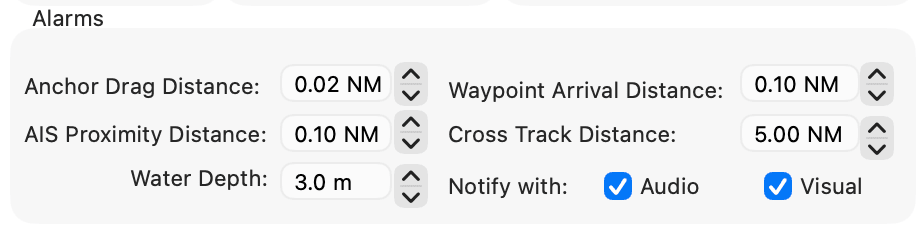
| Field | Range | Default |
|---|---|---|
| Anchor Drag Distance | 0.01 to 0.10 NM | 0.02 NM (about 37 m) |
| Waypoint Arrival Distance | 0.01 to 10 NM | 0.10 NM |
| Cross Track Distance | 0.01 to 50 NM | 5.00 NM |
| Water Depth | 0 to 100 ft, in 1 ft steps | 10 ft (about 3 m) |
| AIS Proximity Distance | 0.01 to 100 NM | 0.10 NM |
Notify with sets how an alarm gets your attention. Audio plays a sound and speaks the alarm’s message; Visual shows an alert with an OK button. Both start on. With both off, an alarm switches itself off without telling you. Alerts appear on HelmStation’s own windows and don’t bring HelmStation in front of other apps, so keep Audio on.
Anchor Alarm
Once anchored and settled, choose GPS > Anchor Alarm. HelmStation records your position and draws a red circle of the Anchor Drag Distance around it on the chart. The alarm goes off when your GPS position is that distance or more from the recorded one. It measures from where the boat was, not from the anchor, so allow for swinging on your rode.
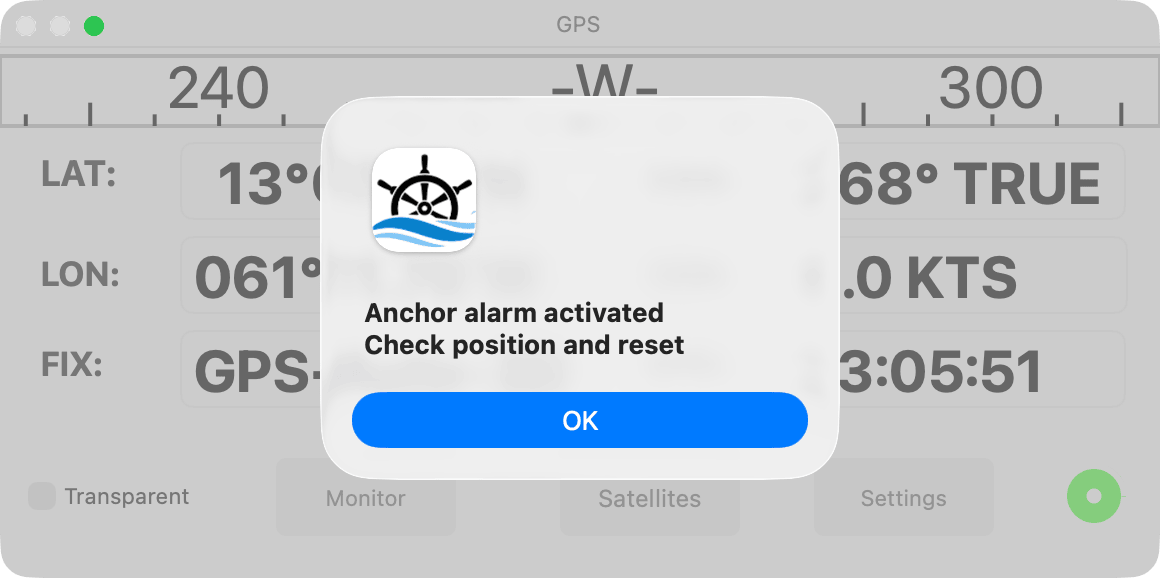
The alert reads “Anchor alarm activated” and “Check position and reset”, and appears on the GPS window. With Audio on, HelmStation plays an alarm sound and speaks the message; if Visual is also on, it repeats every 10 seconds until you click OK. Turning the alarm on again starts a new circle from where the boat is now. See GPS and Position.
Arrival Alarm
Starting a Goto, to a waypoint or along a route, turns the Arrival Alarm on if HelmStation has a GPS position, and draws a red circle of the Waypoint Arrival Distance around the waypoint. Waypoints > Arrival Alarm also turns it on or off. See Waypoints and Routes.
The alarm goes off when you come within that distance of the Goto waypoint. It also goes off if you pass the waypoint, once it is abeam or behind you relative to the line from where the leg began. The alert reads “Waypoint arrival alarm activated” and names the waypoint. With Routes > Auto Next on, HelmStation then moves to the next waypoint and turns the Arrival Alarm on again.
Cross Track Alarm
After you start a Goto, choose Waypoints > Cross Track Alarm; it isn’t turned on for you. It goes off when you are the Cross Track Distance or more to either side of the course line from where the current leg began to the Goto waypoint. The alert reads “Cross Track alarm activated”.
It turns off whenever the Goto ends or moves to another waypoint, including when Auto Next starts the next leg. Turn it on again for each leg.
Depth Alarm
The Depth Alarm uses your depth sounder only, and doesn’t need a GPS fix. Instruments > Depth Alarm becomes available once the sounder has reported a depth. See Instruments.
It goes off as soon as the sounder reports a depth at or below Water Depth. It uses the depth your sounder sends, as shown in the Instruments window, so allow for where your transducer sits. The alert reads “Depth alarm Activated” and shows the reading.
Proximity Alarm
Choose AIS > Proximity Alarm. Each time your GPS position updates, HelmStation checks every AIS target it receives, even those hidden with AIS > Show. If any is within the AIS Proximity Distance, the alarm goes off. The alert reads “Proximity alarm activated”, names the closest vessel, and appears on the AIS window. Only the current distance counts; the alarm doesn’t predict a closest point of approach. See AIS Targets.
Keeping alarms working
- Keep the chart window in view. The Arrival, Cross Track and Depth alarms don’t check while the chart window is minimized to the Dock or HelmStation is hidden (HelmStation > Hide HelmStation), although their menu items stay checked. Closing the chart window cancels any Goto, which turns the Arrival and Cross Track alarms off. The Anchor and Proximity alarms keep working.
- Minimize the GPS, Instruments and AIS windows rather than closing them. Closing the Instruments or AIS window disconnects it if it has a port of its own. Closing the GPS window disconnects a USB Serial GPS while Disconnect when Closed is on in the GPS group of Settings (on unless you change it). When the GPS disconnects, the Anchor Alarm turns off and any Goto is canceled.
- Keep your Mac awake. When it sleeps, HelmStation closes its GPS, Instruments and AIS connections. With a USB Serial GPS the Anchor Alarm turns off, and stays off after the Mac wakes.
- Watch for lost data. If a USB Serial GPS sends no position for about 1.5 minutes, HelmStation plays a buzz, shows “No position data received from GPS within last 1.5 minutes” and cancels any Goto. The Anchor Alarm stays on and resumes checking when positions return. There is no such warning for a TCP/IP Network GPS, or when your sounder stops sending: the Instruments window keeps showing the last depth, and the Depth Alarm can’t go off.