Help Docs
HelmStation Online Documentation
Weather (GRIB)
HelmStation can draw weather and ocean forecasts on the chart from GRIB files: wind, pressure, waves, currents, temperature and rain, given on a grid of points for a series of forecast times. GRIB files are small, so they are practical to receive by email at sea. You can request one from the Saildocs service from within HelmStation, or open one you already have.
GRIB data is raw computer model output. Use it alongside official forecasts and your own observations.
Requesting a GRIB
Requests are made from the Weather > Request GRIB submenu, which is available while the chart window is open. It holds two kinds of item:
- Data items make a request straight away: Surface Wind, Surface Wind (COAMPS), 500mb Height, Currents, Wave, Sea Temperature, Air Temperature and Precipitation Rate.
- Options are marked with a checkmark and shape the requests you make next: Days, Interval, Resolution and Reduced Area. Set them before you choose a data item. HelmStation remembers them.
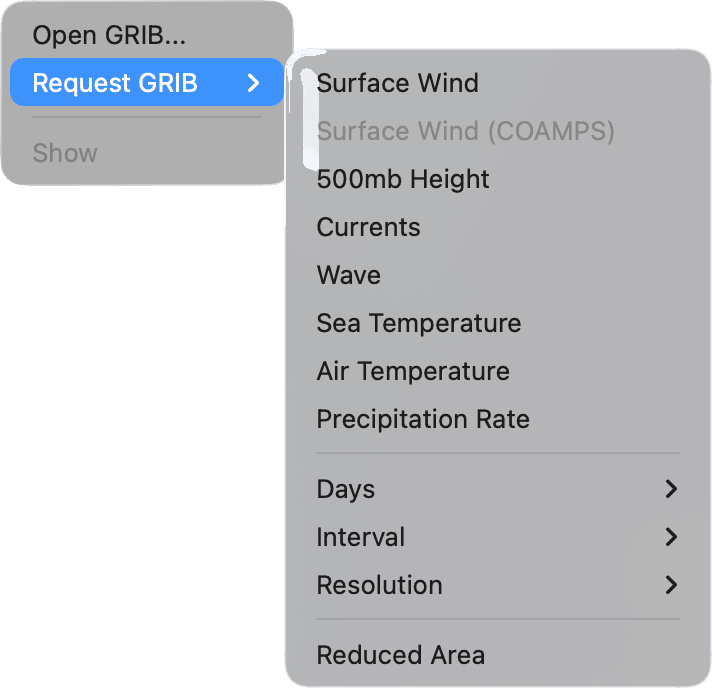
What each data item asks for
| Item | Forecast data |
|---|---|
| Surface Wind | Wind and sea-level pressure, from the GFS global model |
| Surface Wind (COAMPS) | Wind and pressure from the COAMPS model, in three regions only |
| 500mb Height | Wind and height at the 500 mb level |
| Currents | Ocean currents and sea temperature, in one region only |
| Wave | Significant wave height and wave direction |
| Sea Temperature | Sea temperature |
| Air Temperature | Air temperature |
| Precipitation Rate | Rain |
Days, Interval and Resolution
- Days (3 Days, 5 Days or 7 Days) sets how far ahead the forecast runs.
- Interval (3 Hours, 6 Hours, 12 Hours or 24 Hours) sets the time between forecasts. For example, 3 Days at 12 Hours gives forecasts at 0, 12, 24 and so on up to 72 hours.
- Resolution (0.5º, 1.0º or 2.0º) sets the spacing of the grid points, in degrees of latitude and longitude. A finer grid shows more detail but makes a bigger file.
They start at 3 Days, 12 Hours and 0.5º. Surface Wind (COAMPS) and Currents don’t use them: COAMPS always covers 48 hours at 6-hour intervals on a 0.2° grid, and Currents 120 hours at 12-hour intervals on a 0.25° grid.
The request area
HelmStation asks for a square 50° of latitude by 50° of longitude. With Reduced Area checked, the square is 20° by 20°, for a smaller file. The zoom of the chart doesn’t matter. The square is centered:
- on your boat, while HelmStation has a position from your GPS and View > Position > Centered is on.
- otherwise, on the middle of the chart window.
To request an area away from your boat, turn Centered off and move the chart so that the area you want is in the middle.
Surface Wind (COAMPS) is available only when the center of the request is at least 5° inside one of these regions (2° with Reduced Area):
- 29°N to 60°N, 160°W to 114°W (eastern North Pacific).
- 20°N to 55°N, 93°W to 55°W (western North Atlantic).
- 0° to 32°N, 120°W to 60°W (Central America and the Caribbean).
Currents is available only when the center of the request is, by the same margin, inside 20°S to 70°N, 100°W to 0°.
Sending the request
When you choose a data item, HelmStation opens a new message in your default mail app, addressed to query@saildocs.com with the subject “GRIB Request”. Its body is a single line telling Saildocs what to send; you don’t need to change anything. Click Send in your mail app. HelmStation doesn’t send the message itself.
Saildocs replies to the address you sent from, with the GRIB file attached. Save the attachment, then open it in HelmStation.
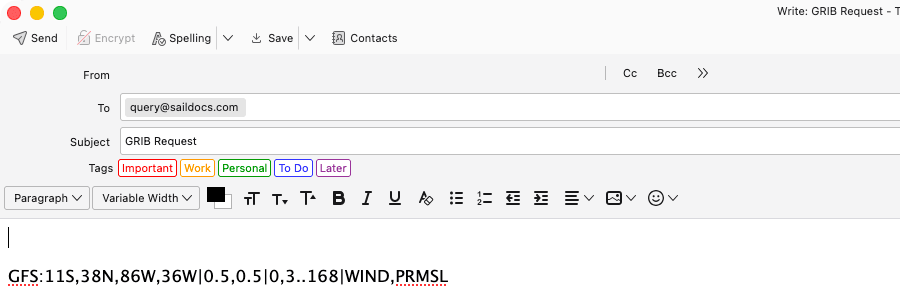
Opening a GRIB file
Choose Weather > Open GRIB…, pick the file and click Open. Or, in the Finder, Control-click a .grb file and choose Open With > HelmStation; HelmStation then also moves the chart to the forecast area.
HelmStation shows one GRIB file at a time: opening another replaces it. The file isn’t reopened the next time you open HelmStation.
If the file holds nothing HelmStation can show, it says “File did not contain any wind speed, wind direction, wave height, wave direction, pressure, current or temperature data”.
HelmStation draws the data only at the grid points in the file. If you can’t see it all, zoom out, or click Scroll To in the Weather window.
The Weather window
Opening a GRIB file draws the forecast on the chart and brings up the Weather window. It floats above the chart, and hides while you are using another app.
Weather > Show turns the forecast and the Weather window on and off together. It’s available once a GRIB file is open. Closing the Weather window also takes the forecast off the chart; choose Weather > Show to bring both back.
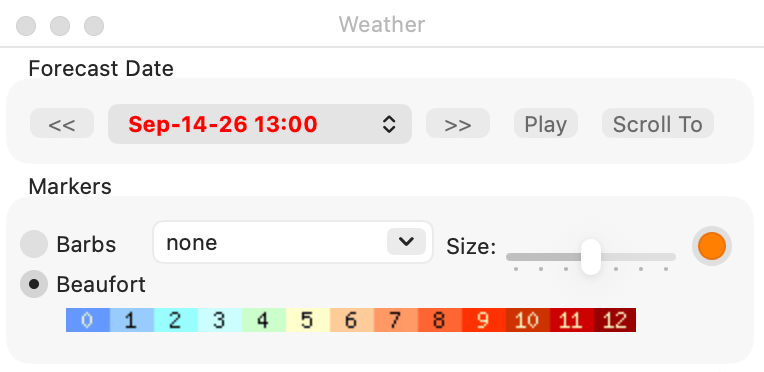
Forecast Date
- The date menu (“Select forecast”) lists every forecast time in the file, in your Mac’s local time. Times that have already passed are shown in red. When a file opens, HelmStation shows the first forecast that hasn’t passed yet, or the last one if they all have.
- « and » step to the previous and next forecast. At either end they go round to the other end.
- Play steps through the forecasts every 1.5 seconds, over and over. While it runs, the button reads Stop; click it to stop. It’s available when the file has more than one forecast time.
- Scroll To moves and zooms the chart to show the whole forecast area.
Markers
- Barbs and Beaufort choose how wind is drawn, and are available when the forecast has wind. Barbs draws a wind barb at each grid point: each long line is 10, a shorter line the remainder, and a pennant 50, in the wind speed units you chose with Select… in the Units group of Settings. Beaufort draws an arrow filled with the color of its Beaufort force (see below). The color strip in the Markers box is the key.
- The Size slider sets the size of the wind, wave and current markers.
- The color well (“Vector color”) sets the color of the barbs, of the outline of the Beaufort arrows, and of the wave arrows. It starts orange. Current arrows are colored by current speed instead, and for currents the strip shows speed in knots.
- The contour menu (“Select contour plot”) draws contour lines, with their values, for one kind of data in the file: Pressure, Geopotential Height, Air Temperature, Sea Temperature, Wave Height, Wave Period or Precipitation Rate. Only the kinds in the file are listed. Choose none for no contours. Air Temperature, Sea Temperature and Precipitation Rate are drawn on their own, without any markers.
Pressure is in millibars. Temperatures and wave heights use the units you chose in the Units group of Settings.
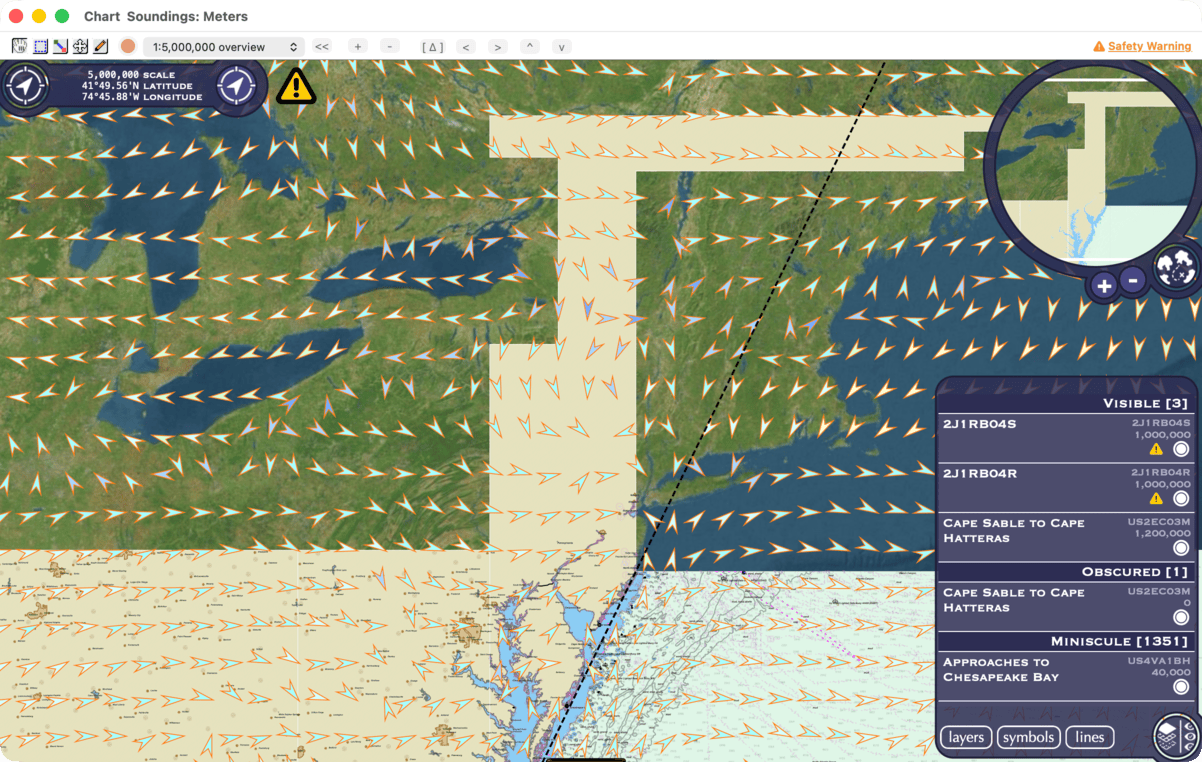
Beaufort colors
In Beaufort mode, each arrow takes the color of the force its wind speed falls in, from blue for the lightest winds through green, yellow and orange to dark red. The forces use these speeds, whatever your wind speed units:
| Force | Wind speed (knots) |
|---|---|
| 0 | under 1 |
| 1 | 1 to under 3 |
| 2 | 3 to under 7 |
| 3 | 7 to under 11 |
| 4 | 11 to under 17 |
| 5 | 17 to under 22 |
| 6 | 22 to under 28 |
| 7 | 28 to under 34 |
| 8 | 34 to under 41 |
| 9 | 41 to under 48 |
| 10 | 48 to under 56 |
| 11 | 56 to under 64 |
| 12 | 64 and over |